AI AD COMPLIANCE GUIDE
How to Check Ad Compliance With AI in 2026
Scan ad creatives for possible platform, legal and brand issues before launch, then review and fix flagged items.
Disclosure: This page may contain affiliate links. We may earn a commission at no extra cost to you if you sign up through these links.
Checking ad compliance with AI means using automated analysis to flag parts of an ad that may conflict with platform policies, brand rules or legal requirements. It is a screening step—not legal advice and not a guarantee that an advertising platform will approve the campaign.
AI is most useful here as a production and decision-support tool. It can speed up repetitive work and create more options, but the final creative still needs human review, accurate source information and real campaign testing.
For the wider process, see our complete AI advertising guide.
What Does Compliance Checker AI Mean in Practice?
Checking ad compliance with AI means using automated analysis to flag parts of an ad that may conflict with platform policies, brand rules or legal requirements. It is a screening step—not legal advice and not a guarantee that an advertising platform will approve the campaign.
The objective is a repeatable creative workflow. Better inputs create better drafts, careful review reduces avoidable mistakes, and live performance data tells you what deserves another iteration.
What Inputs Matter Most?
| Input | Why It Matters |
|---|---|
| Ad visual | Lets the checker inspect text, layout, branding and visual content. |
| Platform | Provides context for platform-specific advertising requirements. |
| Region or market | Matters because legal and promotional rules can vary by location. |
| Brand guidelines | Helps identify possible logo, tone or brand-positioning issues. |
| Offer details | Allows claims, discounts and conditions to be checked more carefully. |
| Final copy | Ensures the actual words used in the ad are part of the review. |
What to Prepare Before You Start
- Use the final version of the creative whenever possible.
- Choose the actual advertising platform and target market.
- Keep supporting evidence for important claims.
- Confirm that discounts and offers include required details.
- Make sure brand guidelines are current.
- Treat automated results as flags that still require human judgment.
Rule of thumb: If an important fact is unclear before generation, AI usually does not make that uncertainty disappear. Fix the source input first.
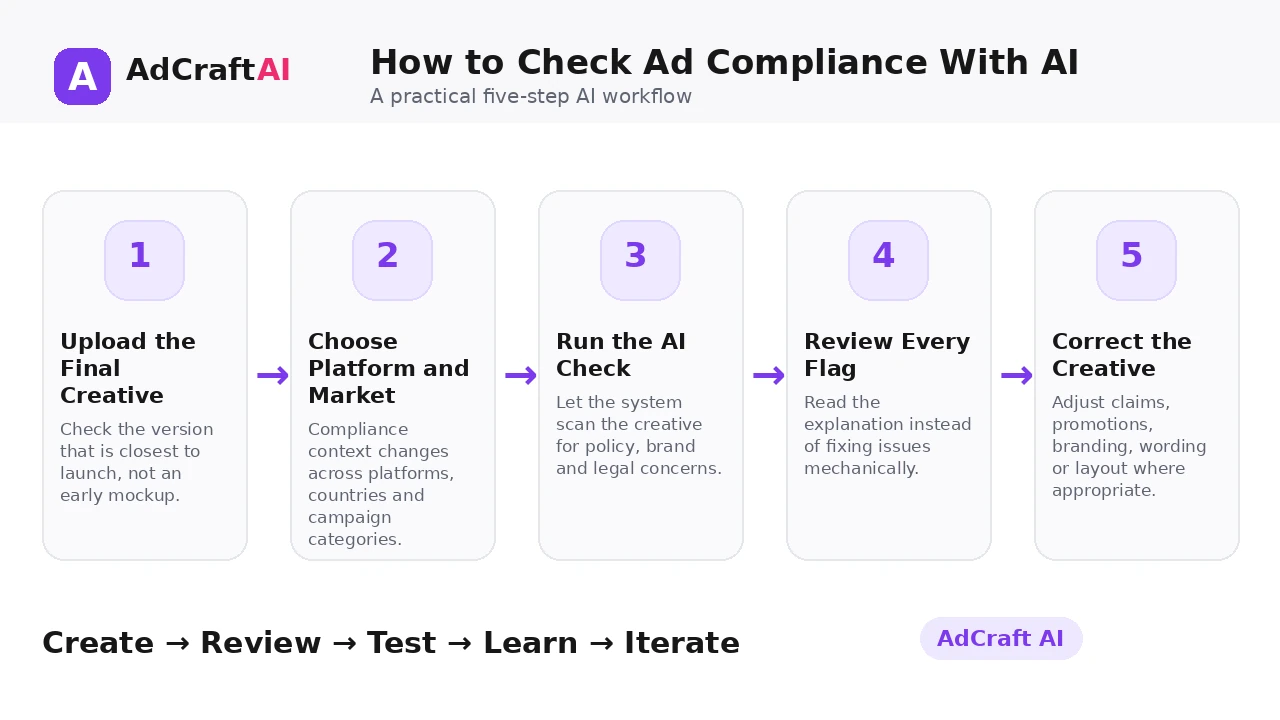
How to Check Ad Compliance With AI: Step by Step
1. Upload the Final Creative
Check the version that is closest to launch, not an early mockup.
2. Choose Platform and Market
Compliance context changes across platforms, countries and campaign categories.
3. Run the AI Check
Let the system scan the creative for policy, brand and legal concerns.
4. Review Every Flag
Read the explanation instead of fixing issues mechanically.
5. Correct the Creative
Adjust claims, promotions, branding, wording or layout where appropriate.
6. Recheck the New Version
Run the edited ad again to confirm that the flagged area changed.
7. Keep Human Approval
Escalate uncertain legal or regulated-category questions to a qualified reviewer.
8. Monitor Platform Feedback
Policies evolve, so use real platform review outcomes to improve your checklist.
How AdCreative.ai Compliance Checker Works
AdCreative.ai currently says its Compliance Checker can review uploaded advertising visuals against platform guidelines, legal requirements and brand-related criteria. The product page shows examples for Meta, Google and LinkedIn and highlights issues such as promotional terms, potentially misleading claims, logo placement and tone of voice.
The tool can speed up pre-launch screening, but it should not be treated as a substitute for platform documentation, internal brand approval or professional legal advice where required.
Explore Compliance Checker AI
Use the feature as part of a practical advertising workflow: generate, review, edit, test and learn from real campaign results.
Explore the AI Tool →What the AI Workflow Can Help With
- Review ad creatives for platform-specific policy concerns.
- Flag possible legal or regulatory issues.
- Check brand elements such as logo usage and tone.
- Provide feedback on promotional and messaging issues.
- Support workflows across major advertising platforms.
- Recheck creatives after changes.
Feature availability can change, so verify the current product interface before building a permanent production process around one specific capability.
What to Review Before Publishing
| Review Area | What to Check |
|---|---|
| Platform policy | Does the ad follow current rules for the intended platform? |
| Promotion terms | Are discounts, deadlines and conditions clear? |
| Claims | Could wording be misleading or unsupported? |
| Brand usage | Is logo placement and tone consistent with brand rules? |
| Restricted content | Does the creative contain content that needs special review? |
| Market context | Are regional rules and required disclosures considered? |
Review is not a formality. The output becomes useful only when it accurately represents the product, offer, brand and campaign objective.
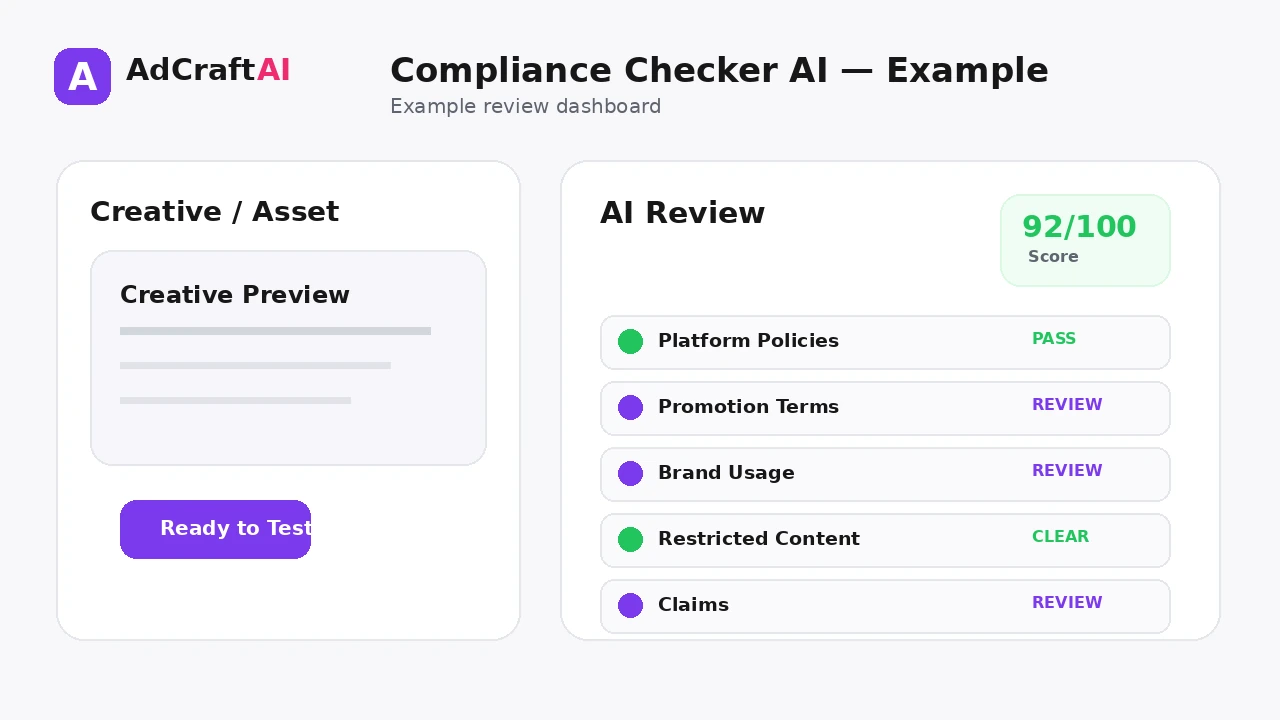
Practical Example: A Discount Ad With Two Flags
Suppose an ecommerce ad says “Save 50% today” and places the logo almost against the edge of the creative.
Flag 1 — Promotion: The offer may need clearer terms or an end date depending on the market and platform.
Flag 2 — Brand usage: The logo may violate internal spacing rules even if the platform itself would accept the ad.
The correct response is not to accept every automated suggestion blindly. Verify the rule, edit the creative and run a second check.
Common Mistakes
Treating AI as legal advice
Automated screening cannot replace qualified legal review when the risk is material.
Checking the wrong market
Rules can differ between countries and regions.
Uploading an old creative
The checked asset should match the version you plan to publish.
Ignoring brand rules
Platform approval does not automatically mean the ad follows your brand system.
Fixing flags without reading them
A recommendation only helps when you understand why the issue was raised.
Assuming approval is guaranteed
Final platform review and enforcement remain outside the checker.
Best Practices for Better Results
- Use one clear campaign goal for each generation session.
- Change one important variable at a time so you know what caused a difference.
- Keep source information accurate and current.
- Review AI output against the real product, offer and brand.
- Use prediction or automated checks as decision support, not as guarantees.
- Let live campaign data determine the next creative iteration.
A strong AI workflow is disciplined. It creates more useful options without turning the campaign into uncontrolled content production.
A Simple Repeatable Workflow
- Define the campaign goal.
- Prepare accurate source inputs.
- Generate a small number of meaningful variations.
- Review the strongest outputs for accuracy and brand fit.
- Run any required compliance or commercial-use checks.
- Adapt the creative for the target placement.
- Launch controlled tests.
- Analyze real campaign results.
- Create the next variation from what you learned.
Continue Building Your AI Advertising Workflow
Frequently Asked Questions
Can AI tell me if an ad will be approved?
AI can flag potential issues, but it cannot guarantee approval. Advertising platforms make their own review decisions.
Can AI check Meta ad compliance?
AdCreative.ai currently presents Meta as one of the platform contexts supported by its Compliance Checker.
Can it check Google and LinkedIn ads?
The current product page also highlights Google and LinkedIn in its platform-compliance workflow.
Can AI check brand compliance?
AdCreative.ai shows examples involving logo usage, brand positioning and tone of voice.
Is an AI compliance checker legal advice?
No. Use it as an operational screening tool, and seek qualified legal advice when necessary.
Should I recheck an ad after editing it?
Yes. Rechecking helps confirm whether the edited version still contains the issue that was originally flagged.
Official Resource
Product features can change. Check the current official information before relying on a specific capability in a permanent workflow.
Final Thoughts
Scan ad creatives for possible platform, legal and brand issues before launch, then review and fix flagged items.
The best use of AI is not to remove judgment from advertising. It is to reduce repetitive production work, create clearer testing options and make the path from idea to measurable campaign faster.
Build Your Next Creative With AI
Explore AdCreative.ai's generation, analysis and creative-production tools, then review the final assets before putting them into a live campaign.
Discover the AI Tool →