AI AD VIDEOS GUIDE
How to Create AI Ad Videos in 2026
Build short-form ad videos from an image or video asset, add campaign text, generate variations and edit the strongest version before launch.
Disclosure: This page may contain affiliate links. We may earn a commission at no extra cost to you if you sign up through these links.
AI ad-video tools reduce the number of manual production steps between a static idea and a short video creative.
AdCreative.ai currently documents an Ad Videos workflow where users choose a video type and size, upload an image or video, add text manually or generate it with AI, then generate the video and edit it if needed.
This is different from a product-only video workflow: the starting asset can be an image or video, and the output is built around a short advertising format with text and editable creative structure.
For the wider strategy around generating, testing and improving advertising assets, see our complete AI advertising guide.
What This Workflow Means in Practice
Build short-form ad videos from an image or video asset, add campaign text, generate variations and edit the strongest version before launch.
The goal is to reduce repetitive work while keeping the final campaign, integration or business decision accurate and measurable.
What Inputs Matter Most?
| Input | Why It Matters |
|---|---|
| Video type | Sets the basic generation path. |
| Size | Matches the video to the intended placement. |
| Image or video | Provides the source asset for the creative. |
| Ad text | Communicates the offer, benefit or CTA. |
| Language | Controls AI-generated text when that option is used. |
| Edit pass | Refines the generated video before download or campaign use. |
What to Prepare Before You Start
- Choose the target placement before generation.
- Use a source asset that is sharp and relevant to the offer.
- Write one clear campaign message.
- Keep on-screen text short enough for mobile viewing.
- Decide what should remain visually unchanged.
- Plan at least two meaningful variations rather than one final output.
Important: Better source information reduces the amount of guessing in the workflow.
How to Create AI Ad Videos: Step by Step
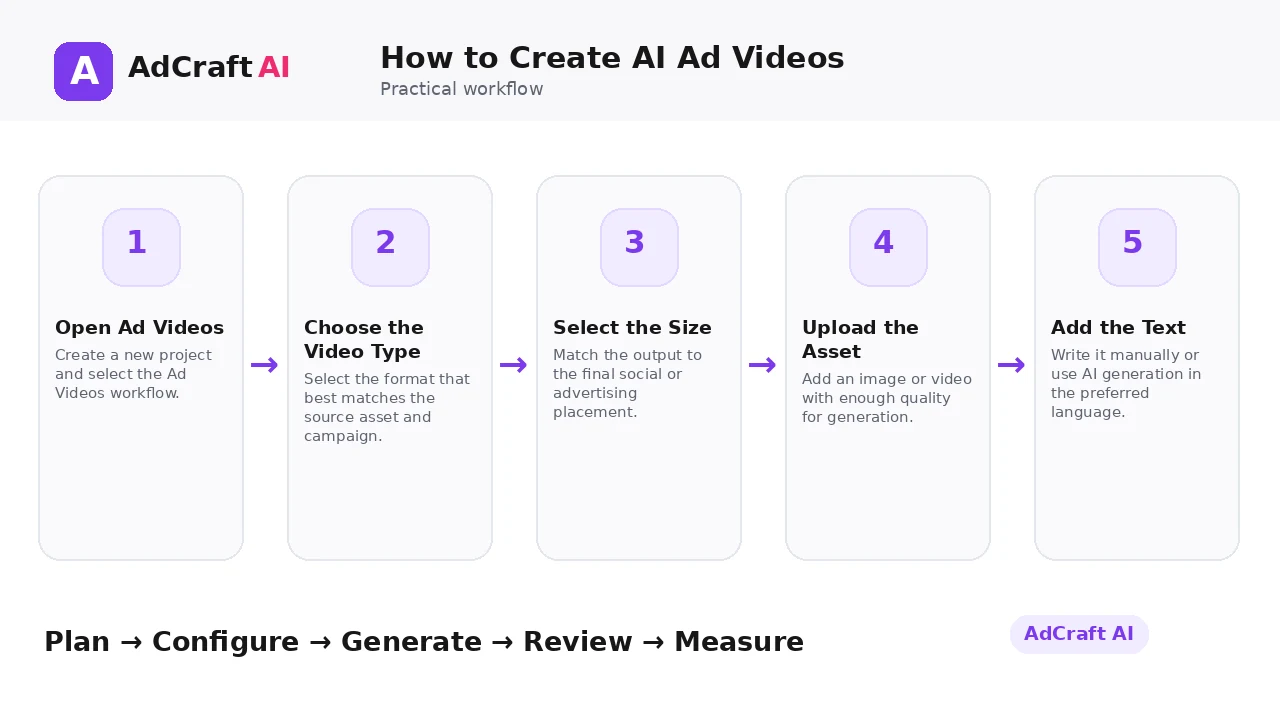
1. Open Ad Videos
Create a new project and select the Ad Videos workflow.
2. Choose the Video Type
Select the format that best matches the source asset and campaign.
3. Select the Size
Match the output to the final social or advertising placement.
4. Upload the Asset
Add an image or video with enough quality for generation.
5. Add the Text
Write it manually or use AI generation in the preferred language.
6. Generate the Video
Create the first version with the chosen inputs.
7. Edit the Result
Use the Edit option to refine the output and save changes.
8. Test the Creative
Compare retention, clicks and conversion behavior after launch.
How AdCreative.ai Ad Videos Work
AdCreative.ai’s current help guide says users can open Brands → Create New Project → Ad Videos, choose a video type, select the size and upload either an image or a video.
The next step is adding text manually or using AI to generate text in the language of your choice. After generation, the documented workflow includes an Edit option for changes before saving.
Treat the generated video as a creative draft. Review pacing, product accuracy, readability and the final CTA before using it in paid media.
Explore the Current AdCreative.ai Workflow
Use the feature as a starting point, verify the current interface and plan details, and review every output before it becomes part of a live campaign.
Explore AdCreative.ai →What to Review Before You Use the Result
| Review Area | What to Check |
|---|---|
| Opening | Does the first second establish the subject quickly? |
| Source fidelity | Does the final video represent the original asset accurately? |
| Text readability | Can the message be read without pausing? |
| Pacing | Does the sequence move fast enough for the placement? |
| CTA | Is the next action clear? |
| Sound-off view | Does the video still make sense without audio? |
Practical Example: Turn One Product Image Into Two Ad Videos
Imagine a direct-to-consumer product with one clean hero image.
Version A — Benefit first: Start with the product, show a short benefit line, then reveal the offer.
Version B — Offer first: Start with the promotional angle, then show the product and CTA.
Keep the product and landing page stable so the test isolates message order and pacing.
Common Mistakes
Choosing the wrong size
A strong edit can still fail if the composition does not match the placement.
Overloading text
Short-form video needs fast comprehension.
Using a weak source asset
Low-quality input limits the usefulness of the output.
Skipping the edit pass
Generated videos may need hierarchy and timing changes.
Changing every variable
Testing is clearer when the offer stays stable.
Ignoring real results
A polished video still needs live performance data.
Best Practices
- Use accurate and current source information.
- Create a small number of meaningful variations before expanding volume.
- Keep brand, offer and landing-page information consistent.
- Use automation and scoring as decision support, not as guarantees.
- Review every asset before delivery or launch.
- Use real campaign or operational data to decide the next iteration.
A Simple Repeatable Workflow
- Define one campaign or workflow goal.
- Prepare accurate source inputs.
- Configure the relevant brand, account or creative settings.
- Generate or complete a small first batch.
- Review accuracy, brand fit and operational risk.
- Deliver or launch only approved assets.
- Measure the result with the appropriate data source.
- Document what worked and what failed.
- Use the learning to improve the next iteration.
Continue Building Your AI Advertising Workflow
Frequently Asked Questions
Can AdCreative.ai create ad videos from an image?
Yes. Its current help article says the workflow supports uploading an image or a video.
Can I add text to the video?
Yes. Text can be entered manually or generated with AI according to the help documentation.
Can I edit the video after generation?
Yes. The current workflow includes an Edit option.
Is this the same as Product Videos?
No. Ad Videos is a broader ad-creation workflow, while Product Videos focuses on turning product assets into product video variations.
What should I test first?
Start with the opening and message order while keeping the offer stable.
Should I rely on AI without reviewing the final export?
No. Review every final video for accuracy, timing, readability and platform suitability.
Official Resources
Product features, limits, integrations and plan details can change. Verify the current workflow in the official resources below.
Final Thoughts
Build short-form ad videos from an image or video asset, add campaign text, generate variations and edit the strongest version before launch.
The strongest AI advertising workflow combines faster production or analysis with human review and real performance data.
Explore More AdCreative.ai Tools
Compare the current features with your actual creative workflow and use the capabilities that remove real production or analysis bottlenecks.
Discover the AI Tool →