AI ADVERTISING GUIDE
How to Create Google Ads With AI in 2026
AI can help with nearly every stage of Google Ads creation, from researching campaign angles and writing headlines to generating image and video assets. This practical guide shows how to combine Google-native AI tools with human review, campaign testing and a clear advertising strategy.
Disclosure: This page may contain affiliate links. We may earn a commission at no extra cost to you if you sign up through these links.
Artificial intelligence can now assist with many parts of a Google Ads workflow, including keyword research, campaign ideas, responsive search ad copy, image creation, video assets and campaign optimization.
But AI should not replace campaign strategy. A strong campaign still needs a clear offer, relevant search intent, an appropriate landing page, accurate conversion tracking and regular human review.
The most useful approach is to treat AI as a production and optimization assistant while keeping the final business and campaign decisions in human hands.
If you want the broader picture first, read our complete AI advertising guide .
What Does Creating Google Ads With AI Actually Mean?
Creating Google Ads with AI does not mean pressing one button and allowing artificial intelligence to make every campaign decision.
AI can assist with several stages of the workflow:
- Researching customer problems and search intent
- Generating keyword ideas
- Creating ad headlines and descriptions
- Producing image concepts and visual assets
- Generating or editing video assets
- Developing creative variations
- Supporting campaign testing and optimization
Why Use AI for Google Ads?
Google Ads campaigns often need more creative variations than marketers expect. Search campaigns need multiple headlines and descriptions, while other campaign types may also require images, logos and video assets.
AI can make it faster to generate useful starting points and explore different messaging angles without rebuilding every asset from scratch.
- Generate more ad variations faster
- Speed up copywriting and brainstorming
- Explore different campaign angles
- Create and adapt visual assets
- Reduce repetitive production work
- Support structured testing
Important:
AI does not replace a strong offer, conversion tracking, a relevant landing page, campaign strategy or human review.
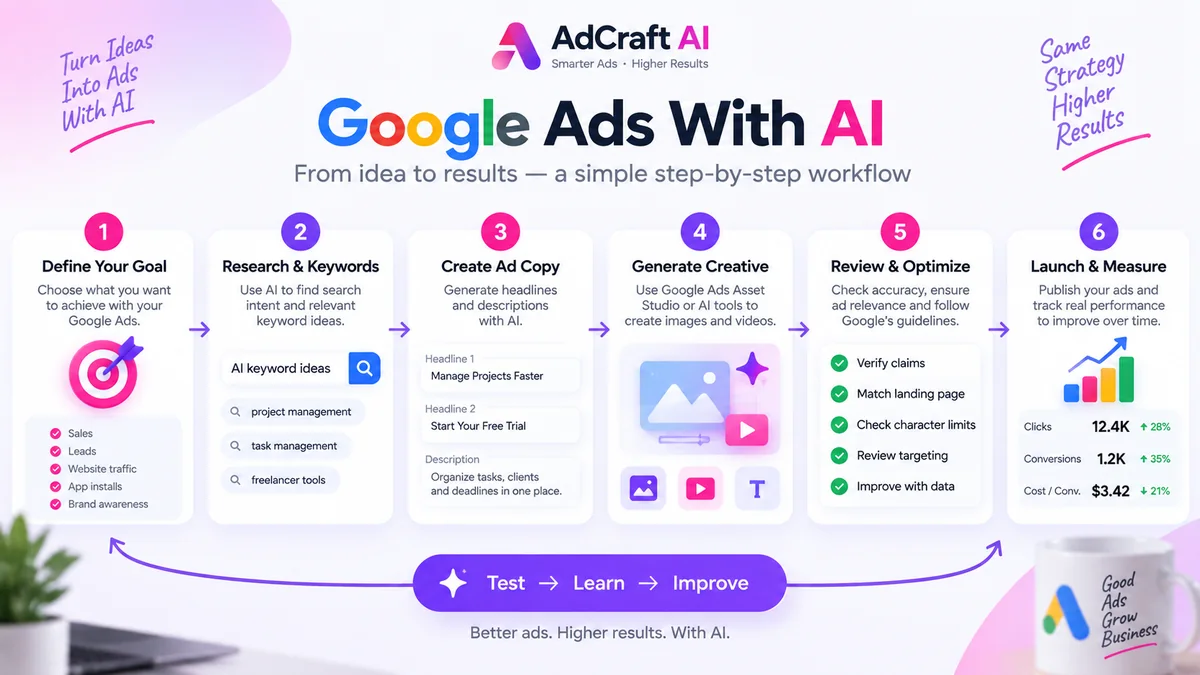
How to Create Google Ads With AI: Step by Step
1. Define Your Campaign Goal
Before asking AI to create anything, define what the campaign is supposed to accomplish.
- Sales
- Leads
- Website traffic
- App installs
- Awareness
Then clarify the product, audience, problem, main benefit, desired action and landing page.
Example campaign brief
Product: Productivity software
Audience: Freelance designers
Problem: Managing several client projects at once
Benefit: Organize tasks and deadlines in one place
Goal: Free-trial signups
Create Google Search ad ideas for a productivity app designed for freelance designers who manage multiple client projects. Focus on saving time, organizing deadlines and starting a free trial. Use a clear professional tone and avoid exaggerated claims.
2. Choose the Right Google Ads Campaign Type
Search campaigns are useful when people are actively looking for a product, service or solution. They give advertisers direct control over keywords, search intent, responsive search ads and landing pages.
Performance Max uses Google AI more broadly across campaign creation and delivery. We cover its generative AI capabilities later in this guide.
3. Research Search Intent and Keywords
AI can help expand keyword ideas, but it should not decide the keyword strategy by itself. Start with the customer problem and the intent behind the search.
Example keyword ideas
project management software
task management for freelancers
organize client projects
freelancer productivity app
Generate 20 Google Ads keyword ideas for a productivity app designed for freelancers managing several client projects. Group them by high commercial intent, problem-aware searches and broader research terms.
Review every suggestion and remove ideas that are too broad, attract the wrong audience or do not match the landing page.
4. Generate Google Ads Headlines With AI
Responsive Search Ads allow advertisers to provide multiple headlines and descriptions so Google can test combinations. Google currently allows up to 15 headlines and 4 descriptions in one responsive search ad, with headline fields supporting up to 30 characters.
Create 15 Google Ads headlines under 30 characters for a productivity app for freelancers. Include different angles: time saving, organization, missed deadlines, simplicity, free trial and client management.
| Angle | Example |
|---|---|
| Benefit | Organize Client Projects |
| Problem | Stop Missing Deadlines |
| Simplicity | Manage Work in One Place |
| Offer | Start Your Free Trial |
5. Write Better Descriptions With AI
Descriptions should add context instead of repeating the headline. A simple structure is:
Keep client tasks, deadlines and projects organized in one workspace. Start your free trial today.
6. Review Character Limits and Ad Relevance
AI does not always respect platform limits perfectly. Review every generated asset before publishing.
- Keyword relevance
- Landing-page consistency
- Product and offer accuracy
- Brand tone
- Unsupported claims
- Call to action
- Spelling and grammar
If the landing page says “14-day trial,” the ad should not claim a “30-day free trial.” The ad and landing page need to tell the same story.
Use Google Ads Asset Studio to Create Ad Assets
Asset Studio is Google's centralized area inside Google Ads for creating, editing, managing and sharing campaign assets. It brings together AI tools for text, images and video.
Advertisers can use prompts, product images and brand guidance to generate and refine creative assets before adding them to campaigns.
Generated assets should still be checked for visual mistakes, weak messaging and product details that do not accurately represent the business.
AI Max for Search Campaigns
AI Max is not a separate campaign type. Google describes it as an optimization layer within existing Search campaigns.
Its features include search term matching and asset optimization, with options such as text customization and final URL expansion.
Do not confuse these two jobs:
AI-generated ad copy helps create campaign assets.
AI Max helps Google optimize how an existing Search campaign matches searches and delivers creative.
Performance Max and Generative AI
Google can use your website as context when helping build a Performance Max asset group and can generate or suggest text, image, logo and video assets.
Advertisers remain involved in the process and can select the assets that make sense for the business.
Remember:
Search + AI Max and Performance Max are not the same campaign setup. Both use Google AI, but they serve different campaign workflows.
Google AI vs Third-Party AI Ad Generators
Google-native tools are useful when you are already working inside Google Ads. Third-party tools can serve a different role when you need a creative workflow that spans several advertising platforms.
| Google Native AI | Third-Party AI Tools |
|---|---|
| Works inside Google Ads | Works in an external creative workspace |
| Uses campaign and account context | Can support cross-platform creative production |
| Useful for Search and Performance Max workflows | Useful for producing creative concepts and variations |
| Connected to Google campaign optimization | Can create assets before they are uploaded to ad platforms |
Where AdCreative.ai Can Fit
AdCreative.ai can be used as part of a broader creative workflow for developing advertising concepts, image variations and copy ideas before adapting selected assets to a specific Google Ads campaign.
If you are evaluating the tool, read our AdCreative.ai pricing and plans guide .
Create More Google Ad Variations With AI
AdCreative.ai can help you generate advertising creatives, copy ideas and multiple variations for your campaigns.
Discover the AI Tool →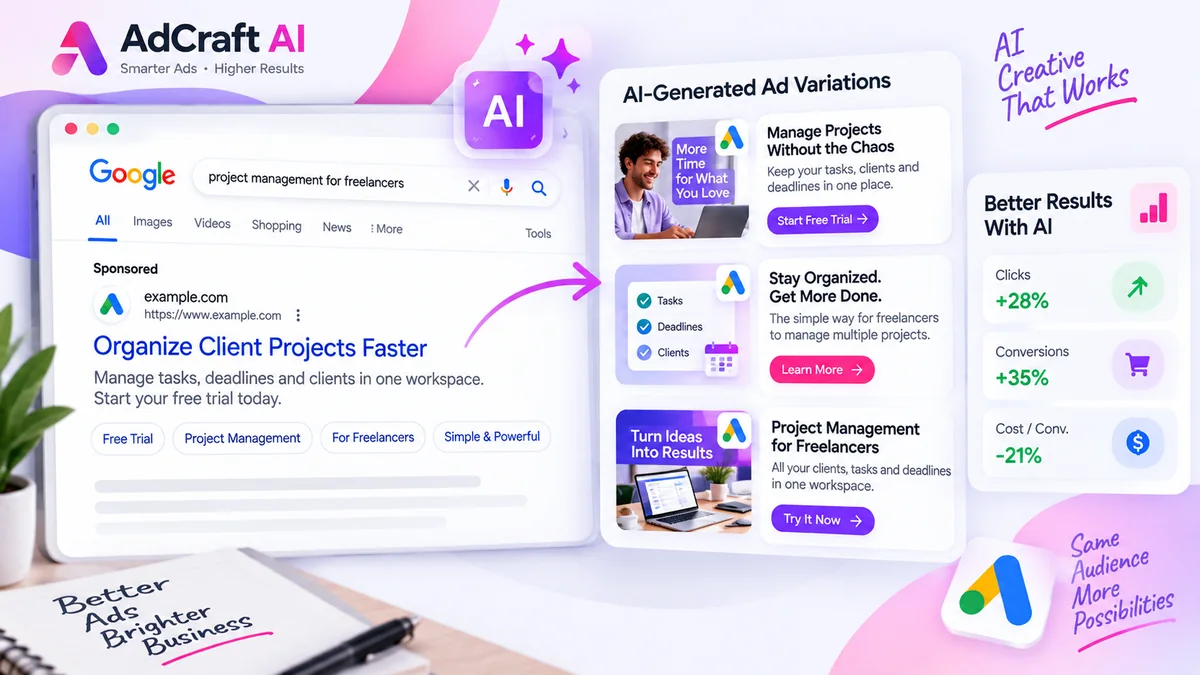
Practical Example: Create a Google Search Ad With AI
Imagine we are promoting a productivity app for freelance designers who manage several clients and projects at once.
Campaign Brief
Audience: Freelance designers
Problem: Managing deadlines across several clients
Benefit: Organize projects in one place
Goal: Free-trial signups
Keyword Ideas
- freelancer project management
- task management for freelancers
- client project management software
- organize freelance projects
AI-Generated Headlines
- Manage Client Projects
- Organize Freelance Work
- Keep Deadlines on Track
- Simplify Project Management
- Start Your Free Trial
- Manage Tasks in One Place
AI-Generated Descriptions
Organize client projects, tasks and deadlines in one workspace. Start your free trial.
Manage freelance work without switching between scattered tools. Try the app today.
Final Human Review
Compare every claim with the actual landing page. Confirm the offer, product features, wording, character limits and campaign relevance before publishing.
- Is the product actually built for this audience?
- Is the free trial currently available?
- Are all benefits accurate?
- Does the wording match the landing page?
- Are all platform limits respected?
How to Test AI-Generated Google Ads
Generating more assets is useful only when you learn from the results. Instead of creating many nearly identical variations, test meaningful differences.
| Version | Main Message |
|---|---|
| A | Save time |
| B | Organize deadlines |
| C | Manage multiple clients |
Review metrics that match the campaign goal, such as click-through rate, conversion rate, cost per conversion, conversion value, search terms and landing-page performance.
Common Mistakes When Creating Google Ads With AI
Using Generic Prompts
Generic inputs usually produce generic advertising. Give AI information about the product, audience, problem, offer, benefit, tone and campaign goal.
Publishing AI Copy Without Reviewing Claims
Verify prices, features, discounts, trial periods, statistics, guarantees and other factual claims before using generated copy.
Sending Traffic to a Weak Landing Page
Better ad copy cannot fix a landing page that does not support the promise made in the advertisement.
Creating Too Many Similar Variations
Ten headlines that communicate the same idea are not ten meaningful tests. Create genuinely different angles.
Letting AI Choose Strategy Without Business Context
AI can assist decision-making, but customer knowledge, positioning and business context should guide the campaign.
Confusing AI Max With a Separate Campaign Type
AI Max is an optimization layer for Search campaigns, not a separate campaign type.
A Simple AI Google Ads Workflow
- Define the campaign goal.
- Understand the target audience.
- Research search intent.
- Build a focused keyword list.
- Generate several messaging angles.
- Create headlines and descriptions with AI.
- Generate or edit creative assets where needed.
- Review accuracy, claims and platform limits.
- Launch the campaign.
- Measure real performance.
- Use campaign data to create the next variations.
Build a Broader AI Advertising Workflow
Google Ads is one part of a wider AI-assisted advertising strategy. The same campaign idea can often be adapted for other platforms while changing the format and creative style.
Frequently Asked Questions About Google Ads With AI
Can AI create Google Ads?
Yes. AI can assist with keyword ideas, headlines, descriptions, images, video assets, campaign concepts and optimization. Human review is still important before publishing.
Does Google Ads have built-in AI tools?
Yes. Google Ads includes AI-powered tools and features such as Asset Studio, AI Max for Search and generative AI capabilities in Performance Max.
What is AI Max for Search?
AI Max is an optimization layer for Search campaigns. It includes AI-powered targeting and creative features such as search term matching and asset optimization.
Is AI Max a separate campaign type?
No. Google describes AI Max as an optimization layer within existing Search campaigns.
Can AI write Google Ads headlines?
Yes. AI can generate headline ideas, but final versions should be reviewed for relevance, accuracy, brand tone and platform character limits.
Can AI create images for Google Ads?
Yes. Google Ads Asset Studio includes AI-powered image creation and editing capabilities for supported workflows.
Can Google AI create video assets?
Yes. Asset Studio and supported Google Ads workflows include tools for generating or adapting video assets.
Can I use ChatGPT for Google Ads?
A general-purpose AI assistant can help brainstorm keywords, messaging angles, headlines, descriptions and testing ideas. The output should be reviewed before being used in a live campaign.
Can I use AdCreative.ai for Google Ads?
AdCreative.ai can help create advertising concepts and creative assets that can be adapted as part of a broader Google Ads workflow.
Should I review AI-generated Google Ads before publishing?
Yes. Review generated assets for accuracy, brand consistency, policy compliance, platform limits, landing-page consistency and offer details.
Official Google Ads Resources
Google Ads features can change over time. Check the official documentation below for current platform details.
Final Thoughts
AI can make Google Ads production faster by helping with research, ad copy, creative assets and campaign variations.
But faster production does not automatically mean better advertising. Strong campaigns still depend on clear positioning, relevant search intent, accurate claims, useful landing pages, reliable conversion tracking, structured testing and human review.
Use AI where it removes repetitive work. Keep strategy, accuracy and final campaign decisions in human hands.
Explore AI-Powered Ad Creation
If creating enough fresh ad variations is slowing down your workflow, an AI-focused advertising tool may be worth testing.
AdCreative.ai is one option designed for generating advertising creatives and creative variations.
Discover the AI Tool →